|
Convert format of entire text files |

|

|

|
|
Convert format of entire text files |
|
|
|
To convert a series of whole text files from one format to another, choose one or more of these options:
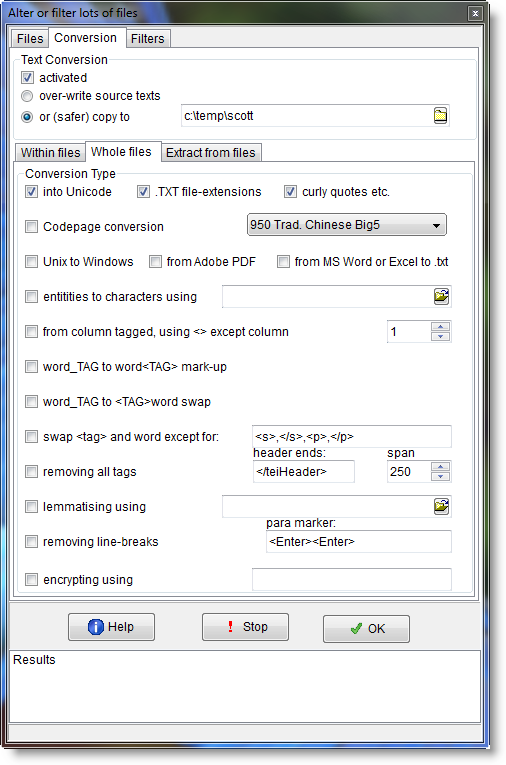
These formats allow you to convert into formats which will be suited to text processing.
.... this is a better standard than ANSI as it allows many more characters to be used, suiting lots of languages. This is UTF16 Unicode, 2 bytes for each character. (UTF8, a format which was devised for many languages some years ago when disk space was limited and character encoding was problematic, is generally not suitable. That's because it uses a variable number of bytes to represent the different characters. A to Z will be only 1 byte but for example Japanese characters may well need 2, 3 or even more bytes to represent one character.) |
... makes the filename end in .txt (so that Notepad will open without hassling you; Windows was baffled by the empty filenames of the BNC editions prior to the XML edition). If you choose this you will be asked whether to force .txt onto all files regardless, or only ones which have no file extension at all. |
... changes any curly single or double quote marks or apostrophes into straight ones, ellipses into three dots, and dashes into hyphens. (Microsoft's curly apostrophes differ from straight ones.) |
.. allows you to convert 1-byte based formats, for example from Chinese Big5 or GB2312, Japanese ShiftJis, Korean Hangul to Unicode. |
... Unix-saved texts don't use the same codes for end-of-paragraph as Windows-saved ones. |
... into plain text. Not guaranteed to work with every .PDF as formats have changed and some are complex. |
... like using "Save as Text" in Word or Excel. Handles .doc, .docx (Office 2007) and .xls files. |
... converts HTML or XML symbols which are hard to read such as é to ones like é. Specify these in a text file: html_entities.txt comes with WordSmith so is in your Documents\wsmith5 folder; look inside and you'll see the syntax. |
 from column tagged, using <> except column
... The Stuttgart Tree Tagger produces output like this separating 3 aspects of each word with a <tab>:
If you set the column to 1, Text Converter will convert this to
The<DT><the> TreeTagger<NP><TreeTagger> is<VBZ><be> easy<JJ><easy> to<TO><to> use<VB><use> .<SENT><.> (it will present the text as running text, no longer in columns, but with a break every 80 characters.) |
... converts text like It_PP is_VBZ easy_JJ to It<PP> is<VBZ> easy<JJ>
Note: before it starts, it will clear out any existing <> markup. |
The Helsinki corpus can come tagged like this (COCOA tags) the_D occasion_N of_P her_PRO$ father's_N$ death_N and this conversion procedure will change it to <D>the <N>occasion <P>of <PRO$>her <N$>father's <N>death
Note: this procedure does not affect underscores within existing <> markup. |
swap tag and word except for
... converts text like It<PP> is<VBZ> easy<JJ> to <PP>It <VBZ>is <JJ>easy or vice-versa. In other words swapping the order of tags and words. The procedure effects a swap at each space in the non-tagged text sequence.
Fill in the box to the right with any tags which should not be included in the swap, using commas to separate them, for example sentence and paragraph tags such as <s>,</s>,<p>,</p> |
... would convert The<DT><the> TreeTagger<NP><TreeTagger> is<VBZ>... into The Treetagger is. Can plough through a copy of the whole BNC, for example, and make it readable. If you have specified a header string it will cut the header up to that point too. Uses the selected span for looking for the next > when it finds a <. |
... converts each file using a lemma file. Where your source text has "she was tired" and your lemma file has BE -> AM, WAS, WERE, IS, ARE, then you will get "she be tired" in your converted text file. Where your source text has "Was she tired?" you'll get "Be she tired?" |
... replaces every end of line line-break with a space. Preserves any true paragraph breaks, which you must ensure are defined (default = <Enter><Enter> -- in other words two line-breaks one after the other with no words between them). |
... allows you to encrypt your text files. You supply your own password. When WordSmith processes your text files, e.g. when running a concordance it will restore the text as needed but otherwise the text will be unintelligible. Encrypted files get the file extension .WSencrypted. For example, if your original is wonderful.txt the copy will be wonderful.WSencrypted. Requires the safer copy to button above to be selected. |
See also: convert within text files, MS Word documents, Guide to handling the BNC
Page url: http://www.lexically.net/downloads/version5/HTML/?convert_text_file_format.htm

