|
WordSmith Controller WordList Settings |

|

|

|
|
WordSmith Controller WordList Settings |
|
|
|
These are found in the main Controller under Adjust Settings | WordList.
This is because some of the choices -- e.g. Minimum & Maximum Settings -- may affect other Tools.
There are 2 sets : What you Get and What you See.
WHAT YOU GET
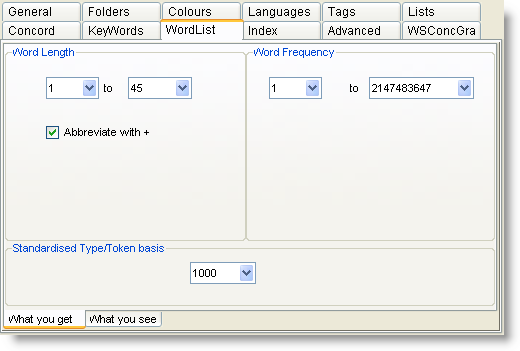
Word Length & Frequencies
See Minimum & Maximum Settings.
Standardised Type/Token #
See WordList Type/Token Information.
WHAT YOU SEE
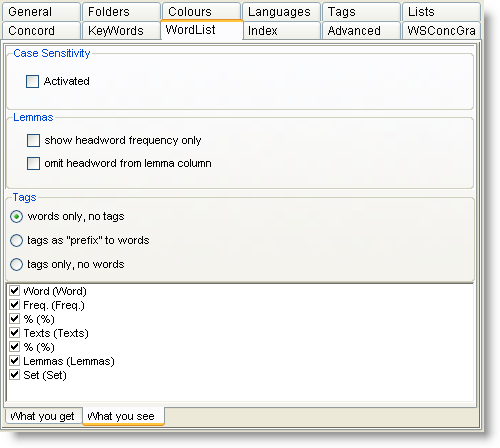
Tags
By default you get "words only, no tags". If you want to include tags in a word list, you need to set up a Tag File first. Then choose one of the options here.
In the example here we see that BECAUSE is classified by the BNC either as a <w CJS> or a <w PRP>. (That's how the BNC classifies BECAUSE OF...)
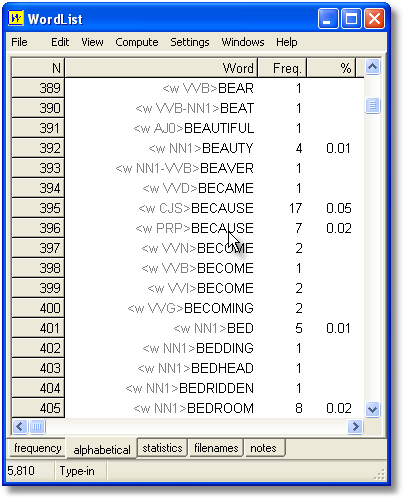
For colours and tags see WordList and Tags.
Case Sensitivity
Normally, you'll make a case-insensitive word list. If you wish to make a word list which distinguishes between the, The and THE, activate case sensitivity.
Lemma Visibility
By default in a word-list you'll see the frequency of the headword plus the associated forms; if you check the show headword frequency only box, the frequency column will ignore the associated wordform frequencies. Similarly, if you check omit headword from lemma column you will see only the associated forms there.
See also: Using Index Lists, Viewing Index Lists, WordList Help Contents, WordList and tags, Computing word list clusters.
Page url: http://www.lexically.net/downloads/version5/HTML/?wordsmithcontrollerwordlistset.htm

