Can I use WordSmith 3, 4 and 5 at the same time?
Yes, you should be able to. They do not share folders or files with each other. (WordSmith versions 1-4 are not being developed any further.)
What are the differences between WordSmith 3 and 4?
In theory, anything WS3 can do WS4 can do better. WS4 has far fewer limitations, such as the number of concordance lines, etc. There are not supposed to be any functions which you can do in WS3 which are not in WS4 too. There are a whole lot of new functions and tools in WS4 too -- click here for full Online Help and look at Overview | What's new in Version 4.
It crashed -- I sent Microsoft a message but they cannot solve the problem.
Not your fault! Microsoft won't know how to solve the problem. If you cannot get into WS4 at all, then there is a chance your PC is not powerful enough or you are not running an up-to-date operating system. If you can get in enough to see at least the main WordSmith Tools screen (top left corner of your screen) and then you get a crash after that, on quitting you should also get a chance to send me an email (if you want), which will let me know details of your PC and where the program ran into problems. You may find a fresh download solves the problem. WordSmith Tools is often updated -- thanks to helpful feedback from the user community!
When my temporary registration expires
If you have been given a free temporary use registration, you may wonder what happens when it expires. WordSmith will simply revert to demo mode. Any concordances, wordlists etc you do will be complete as before but you just won't be able to see or print or save as text all the findings. You should visit the OUP website and purchase a registration code. OUP are hoping to be able to have online ordering so if you have a credit card you should be able to buy the code and receive it by email within minutes.
Can WordSmith handle Language X (eg. Igbo)?
See also How WordSmith handles various languages other than English.
There are 3 issues here:
a) processing a string of text and for example finding word breaks, or seeking concordance lines
b) showing results on a screen and in printed form
c) sorting lists of words in alphabetical order.processing a string of text
In a pc, each symbol is only a number such as 5,793 or 65, so in principle any writing system can be accommodated. In WordSmith, recognising word-breaks is done by assuming there is a space or some such between words. This does not apply to all languages: in particular, Chinese and Japanese do not usually mark word-breaks as English does using spaces (code 32). That means that concordancing should work OK (since we are simply searching for a string of characters) but word-listing is not possible (though character-listing is).
showing results
You need a font which translates the numbers into symbols in pixels. In WordSmith 3, a user can define their own alphabet and own alphabetical order but there are problems in getting a Windows pc to show things correctly.
WS3 uses alphabets which can be represented in one byte (a number between 0 and 255), a system which was usual in computers until recently. In practice with such a one-byte representation system there needs to be a "codepage" (a table of 256 characters) which contains the symbols you need. I do not believe there is one suitable for Igbo but I am not sure: presumably computational linguists in Nigeria will know. The Windows Eastern Europe codepage covers some but probably not all.WS4 can use the old one-byte system still, but also 2-byte Unicode. This contains a very large number of symbols indeed, many thousands of them. For Unicode you will need a Unicode font. Check "Unicode" in a search-engine if this is new to you.
Here is a detailed example of how I made a word list in Igbo.
sorting words
For this, you need a principle for saying whether (for example) an Igbo sub-dotted o is to belong with the other o's or whether it should come after z. WS4 now uses the sorting routines provided by Microsoft instead of my own. The user has to specify which language they are using and Microsoft's sort routines for English, Portuguese, Japanese, French, Russian etc do the sorting. I do not think Igbo is included in the list, but this would only affect the sorting and might not be important in practice. The best thing to do is to tell WS4 that the language you are processing is one which does sort acceptably for your data: this might be Hungarian or Spanish, you will have to experiment to see.
Chinedu Uchechukwu (<neduchi@netscape.net> who works with Igbo and is based in Germany) tells me "The temporary solution I am presently using is "Keyman Keyboard" program, which simply changes the special characters on the German keyboard to Igbo characters." There may be other solutions available.
No. You have to tag your own manually or use a tagger to tag them automatically.
Getting text -- Does WordSmith come with a corpus?
Most corpora are not free for me to distribute. WordSmith 4 comes with Webgetter (see Utilities | Webgetter) which helps download text from the Internet. There is also a link here to the LUCY corpus of texts by kids and students, courtesy of Geoff Sampson (Sussex). Alternatively you can easily build up your own using Internet resources. There are lots of other corpora, some of which are freely accessible, others can be purchased cheaply, and others are extremely expensive. Try a Google search on "text corpus". Or visit newspaper web sites. Or try the Online Books page. The British National Corpus (World Edition) is £50 for a single-user licence, cheap at the price.
Here's an example, written in Pascal.
My registration code didn't work...
Paste in the details you were given. They must be a perfect match!
Supposing you were given this:
Registered to: Maria Antonia Silveira Other details: Registration code: SA40.9273.7215.4681.4554
then you'd fill it in like this, pasting from the email to the updating program:
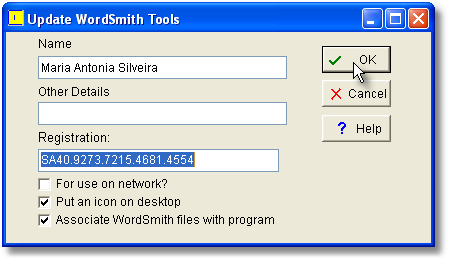
The beta version of WS5 uses the name "temporary use" (not your own name or "temporary user") and a code supplied in the readme.txt file. Run updater.exe after installation to register.
For WS3 registration problems contact Oxford University Press.
How do I get WS4 to work on a network?
Install ONE copy only, on whichever PC is used for networked programs. That is, download to a temporary drive as with a stand-alone installation on any PC, then extract to your network server eg. n:\wsmith4.
Run n:\wsmith4\wordsmith.exe.
Paste in the registration code as you would with a stand-alone version.
Don't forget to check the "For use of network?" box. Leave the others unchecked (assuming you don't want to associate WordSmith files for yourself, or to have an icon on your server desktop). Press OK.
You will see a message telling you the code is OK (if it is!) and can choose OK or Help -- click Help before you press OK. If you miss it, open the main help and look in the installation section under "network defaults". The rest is explained there. You can click here to see the Online version.
If you lose your wordsmith.ini or find the comments have disappeared from it, here is another copy.
Is there a guide for use of WordSmith?
There's a Windows Help file and an Adobe Acrobat wordsmith.pdf manual in your \wsmith4 files and Online Help on this site (all essentially the same). If you press F1 or right-click and see "What's this?" in the program you get Windows Help, if you prefer you can print out the .pdf, or you can view help online here.
There is also a get-you-started online-only guide. There is the manual (.pdf) too.
Collocate statistics
-- what is available?
For the moment the statistics are Mutual Information, MI3, Log Likelihood, Z Score. You now get a chance to choose between various appropriate statistical functions.
It is developed using the latest version available of Windows (currently XP Service Pack 2). The programs are written in the Delphi environment, essentially a version of Pascal, currently Delphi 2007. The fast bits are in Assembler. Apart from some purchased components (eg. a tool for zipping) it is a one-man effort.
SOME TIMINGS
Starting WS4 standalone: 1 second?
Starting WS4 networked on home wireless network, 1st time: approx 15 secs.
Starting WS4 networked on home wireless network, subsequently: approx 13 secs.
WS4 networked making a word list of 480 specific texts on local drive: 15 secs.
WS4 networked making a word list of 480 specific texts on network drive: 46 secs.Network performance will depend on the efficiency of your network equipment and network protocols and the amount of traffic on your servers at the time, factors outside WS4's control, of course. As far as WS4 is concerned, the times when the network is most heavily used are
a) starting up WS4
b) accessing any network as opposed to local hard drives on the individual PC.The network drive where the many component files of the original program are stored is one factor in this. Another is the drive which users may read & write to: this may be a network drive or a local hard drive, depending on wordsmith.ini as concerns this section of it:
[NETWORK]
;network-read/write folder=
;remove semi-colon in line above if running on network
;and change directory to one that users can write to
;prohibited drives=xyz
;limited folder=
; this one only allows the user to see that directory
; & any of its sub-dirs on that drive + speeds processingLet's imagine a site licence situation where the original programs are at V:\WordSmith4. There is a copy of wordsmith.ini at V:\WordSmith4\wordsmith.ini.
Let's imagine this says
[NETWORK]
network-read/write folder=M:\Wsmith4
and that drive M: is a network drive, not local to any PC to be used by WS4 users. Then there will be network traffic whenever users want to save results, access saved results or personal settings on drive M:\Wsmith4.
If it says
[NETWORK]
network-read/write folder=C:\Wsmith4
and C: is a local drive on each user's PC there will NOT be network traffic whenever users want to save results, access saved results or personal settings on drive C:\Wsmith4.
Network administrators may or may not allow writing to C:\ of course. At Liverpool, they allow writing to C:\temp but nowhere else, I think.STARTING UP
I don't think we can do anything about start-up because the operating system needs to access the program at V:\Wsmith4\. If the traffic is jammed it will take time. Standalone (non-networked) startup is around 3 seconds on my PC. Networked startup is bound to require all the resources of wordsmith.exe to be brought over to the networked PC. The same applies to starting up any individual Tool such as Concord. If a set of 50 users double-click the program icon simultaneously they'll be in a queue. At our installation in Liverpool it does take quite a time, maybe 15-20 seconds on one PC (I haven't yet timed it but that's my impression). I have not experienced frustration in Liverpool with this.
AFTER START-UP
Drives get accessed when the user saves or opens any results files (by definition) and whenever WS4 needs to know some setting or other from the drive directory where their settings are stored. In Liverpool I have experienced frustration here and got my students to save at C:\temp with MUCH faster performance.
Which Reference Corpus to use?
I think of it like this. If you compared an apple, let's say a Fuji apple, to a whole lot of apples of various colours and sizes, you would find out the specific nature of the variety of your apple (e.g. a Fuji might be sweeter or redder or bigger than most) but wouldn't find out the "apple-ness" -- for example the fact your apple has a thin skin and small pips would not be at all outstanding, because they all have thin skins and small pips. If you compared the same apple with a mixture of various fruits, its thin skin would be more likely to be outstanding if the mix of fruits contained oranges, bananas, pineapples etc, even if it also contained a few other apples too. What you'd get would be the "apple-ness" in your comparison. You might lose some of the "Fuji-ness". Finally, if you compared the apple to a whole lot of things in your kitchen including other fruit, knives, chairs, cloves of garlic, olive oil, glasses and light bulbs, etc, you would get the "fruit-ness" as well: e.g. the fact that it is relatively solid and doesn't break if dropped but gets bruised. You'd presumably lose some of the "apple-ness" and "Fuji-ness".
Showing Line numbers in a Concordance
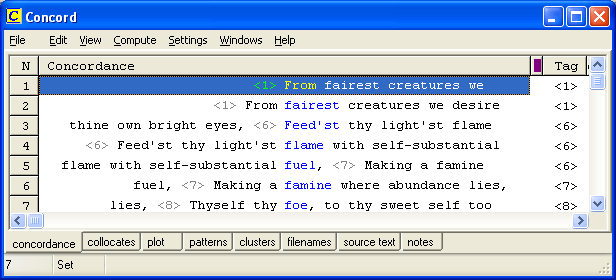
To get results like this where we have a Shakespeare sonnet with line numbers, first ensure all line numbers are marked like this:
<1> From fairest creatures we desire increase,
<2> That thereby beauty's rose might never die,
<3> But as the riper should by time decease,
<4> His tender heir might bear his memory:Then create a tag file containing just this one line:
<#>
Now in Adjust Settings | Tags, load the tag file. Generate your concordance and you should see the line numbers in the Tag column.
Accessing Help with a network installation
Microsoft have moved the goalposts. If you find your users cannot access the WordSmith help across the network, there is a solution here.
"Problem making wordlist" error message (or concordance)
Some time in July or August 2006 there was for a few days a problem of this kind. It comes when WS4 fails to find text files which you had chosen in the file choosing part of the Controller. A workaround would be to import a list of the text files which you have made using Notepad. (To do that, press the Get Favourites button, change the file type at the bottom from "favourite text files (*.dat)" to "self-edited Text file (*.txt)". Then once the list has been successfully read in, save it by pressing the red Save Favourites button to avoid having to do that again.... That way you avoid any problems that might arise in the file chooser which has to be able to get files from the left side to the right side of itself correctly to work properly.
How do I type in accented characters or symbols if I don't have the right keyboard?